Deleting and Reinstalling Pickle
What happens when personal AI agents arrive?
A quick note before you start. Pickle’s app is in Korean, so every screenshot in this piece is in Korean too. If you’re curious what they say, an image translator like Google Lens or your phone’s Live Text will happily do the work for you.
These days, wherever I go among the people around me, everyone is talking about Pickle, a personal AI agent app. In the Explore tab, one of the app’s features, a single request has drawn more than 20,000 people (as of November 10), so my guess is that close to 100,000 people have installed it.
For a few weeks I had seen Pickle pop up in Instagram stories and LinkedIn posts from friends who use AI heavily, but I wasn’t that interested. What really put it on my radar was an article in The Hankyoreh. An AI assistant had called the customer center of Korea’s National Health Insurance Service to ask for a consultation on someone’s behalf, and the counselor on the line wasn’t even allowed to hang up first. My first reaction was “this is dangerous.” Are we heading into a world where AI makes our phone calls for us? I clicked my tongue and had no intention of downloading it myself.
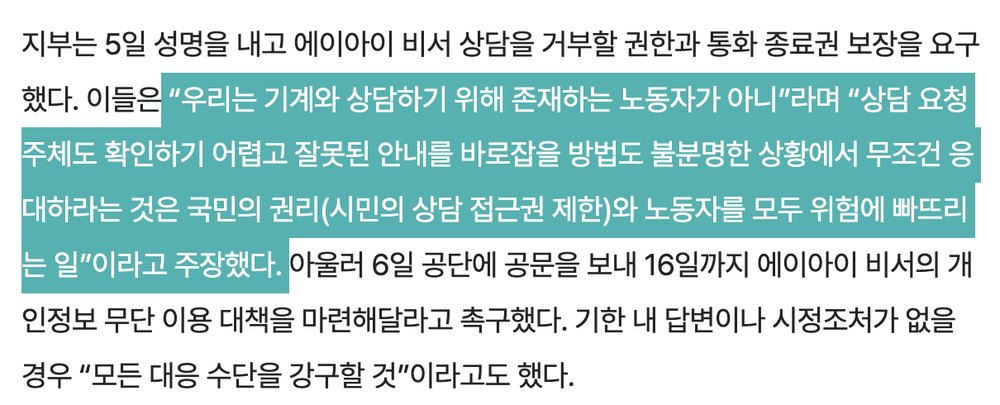
Then last weekend, someone at the AI meetup I run asked me, “Don’t you use Pickle?” I listed my worries and said I’d try it once the service was more stable. On the way home, though, I wasn’t sure that answer was right. Was it really fair to stand there with my arms crossed, saying this is dangerous, it’s probably dangerous, without ever having tried it? I remembered an invite a friend had sent me, and I installed Pickle.
If my impression before using it was “dangerous,” my first impression after installing it was “cute.” What sits between dangerous and cute, what problems and what design, is something I’ll try to come back to at the end.
Reading every term before signing up
Before signing up, I pulled the Privacy Policy, the Terms of Service, the Consent to Collection and Use of Personal Information, and the Location-Based Services Terms, and analyzed them first. (The location terms only became visible after signing up, so I checked those later.) I looked at how data is handled and whether any of the documents contradict each other.
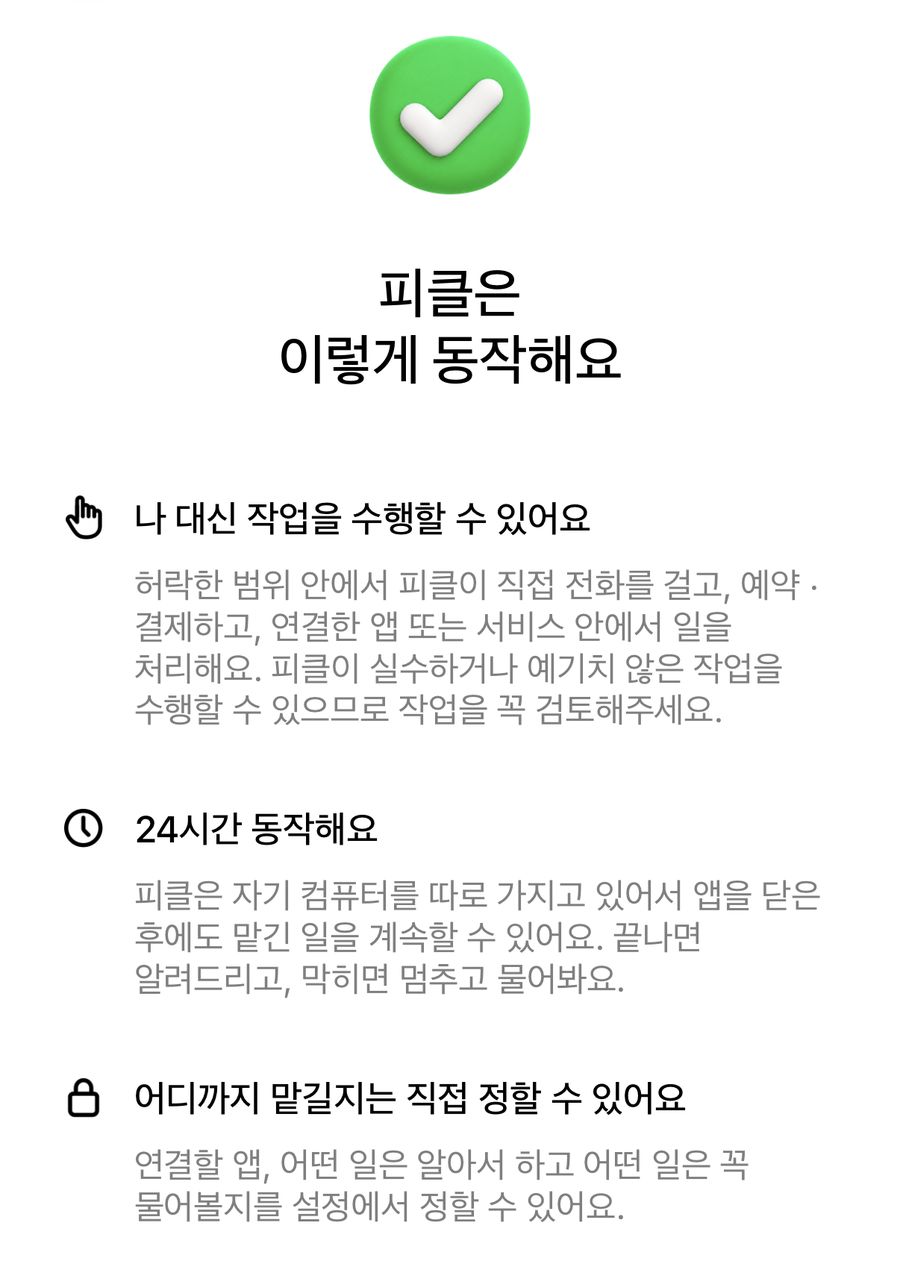
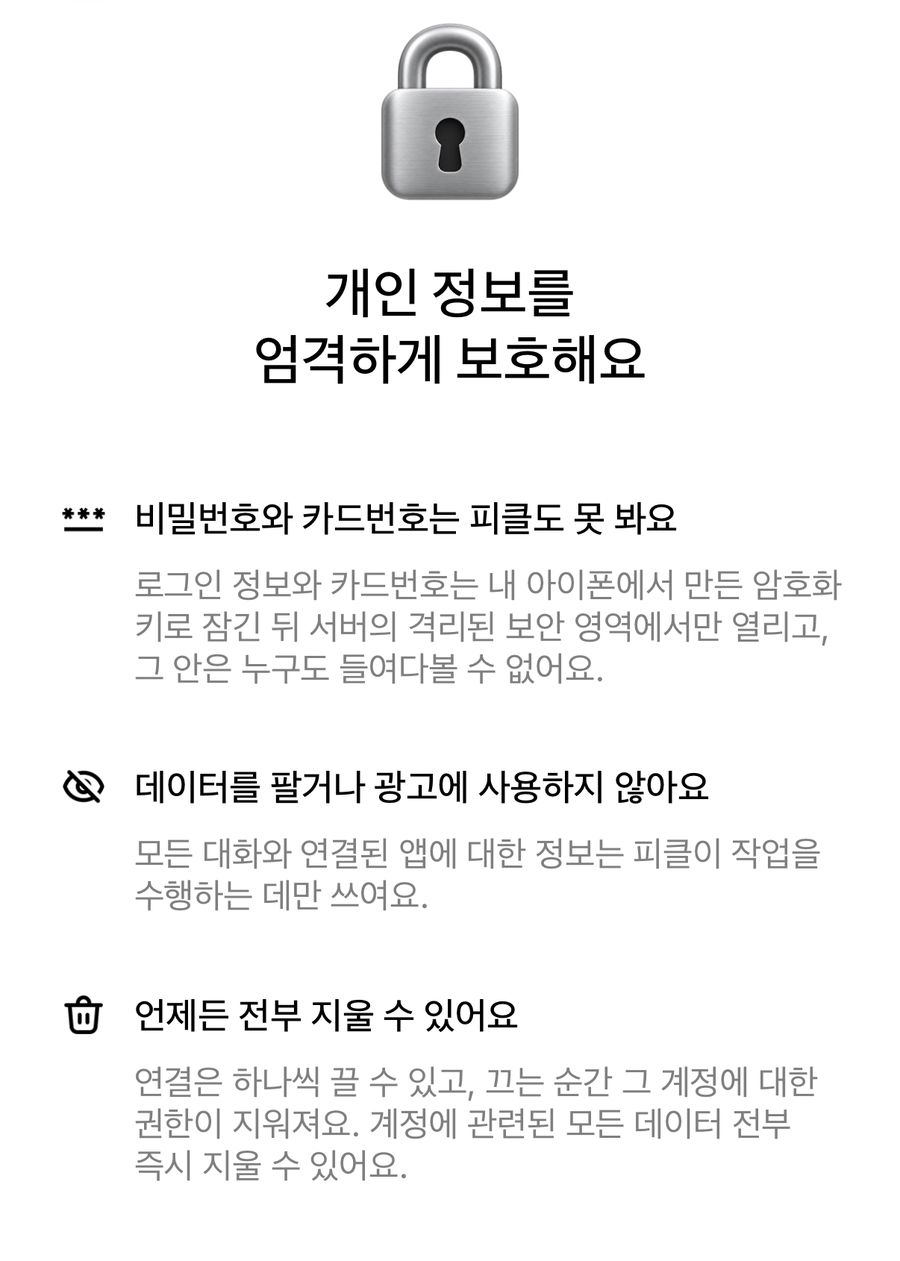
I did the analysis with AI (Claude Opus 5.5). I fed it the full text of the four documents and had it organize them around three questions (how data is stored, how much autonomy Pickle has when making calls, and location data), then checked clause numbers and key wording against the originals. The full write-up is below.
In short, conversations, memories, and task logs stay until you delete your account, and some records remain even after that. Pickle has stretches of time when it can act on its own while you aren’t watching, such as night activity, background tasks, and location triggers, yet the documents mention no setting that turns off phone calls specifically. And responsibility for what Pickle does falls (unsurprisingly) mostly on the user.
Expand the analysis of Pickle's terms, written with AI
1. Where data lives, and for how long
| Data | Who can access it | Retention |
|---|---|---|
| Conversations, memories, task logs | Company servers, AI providers, authorized staff | Until account deletion |
| Voice during calls | Processed in real time by speech recognition and noise reduction vendors | Not stored (only the transcript remains) |
| Camera frames during calls | Company servers, AI providers (not viewable in staff tools) | Frames sampled every few seconds, kept until account deletion |
| Raw AI inputs and outputs (diagnostic mode) | Company | Up to 30 days, only when the company turns it on |
| Server logs | Company | 90 days |
| Card and connection usage logs | Only me (encrypted with my key) | 365 days, even after account deletion |
- AI providers. Model hosts such as Google, OpenAI, Anthropic, xAI, Microsoft Azure, and OpenRouter receive conversations, relevant memories, camera frames, and tool results. They can’t use them for training, but some may keep copies for a short time to monitor abuse (Privacy Policy, sections 5 and 6).
- Camera. Video of other people who appear on screen may be processed the same way. The company says it does not identify people by their faces (Privacy Policy, 1.2).
- Staff access. Staff can view data for operations, investigating problems, safety reports, and legal compliance. Access requires team authentication, and every lookup is logged (Privacy Policy, 7.2).
- Overseas transfer. Data is stored on AWS in the western United States. The only way to refuse the overseas transfer is to not use the service or to delete your account (Privacy Policy, section 5).
- Third parties. Pickle doesn’t sell your information or use it for ads. But there is a discretionary clause allowing disclosure when the company “deems it necessary” for safety or to protect rights (Privacy Policy, section 4).
- What remains after deletion. Your messages in chat rooms shared with others, usage logs for 365 days, diagnostic logs for 30 days (90 days in archive), and purchase records the law requires (Privacy Policy, section 9).
Recommendation. Turn the camera on only when you really need to show something, and turn it off when other people are in frame. The surest approach is never to tell Pickle anything you wouldn’t want others to know.
2. Who makes the call?
Pickle’s documents assume phone calls are “tasks the user has assigned.” But throughout the documents there are moments when Pickle starts work on its own, and nowhere is there a setting that turns off calls alone. For now, users have to set the rules themselves.
What the documents say
- Who calls, and how. Pickle calls from the company’s number, not mine. At the start of a call it says it is the user’s AI assistant and that the call is being transcribed (Terms, Article 4; Privacy Policy, 1.2).
- What remains. Voice isn’t stored. Instead, a transcript of what the other person said and their number are kept with the task log until the account is deleted (Consent form, item 2; Privacy Policy, 1.2).
- Where it goes. Telnyx in the US and Flover (주식회사 플로버), a Korean telecom company, carry the calls, and call audio passes through them (Privacy Policy, section 5).
- Duty to check. The terms only say Pickle is designed to check with you “before spending your money and before other important or hard-to-reverse steps.” Whether a phone call counts is not stated.
- What the website says. Its control page says Pickle does hard-to-reverse things only within the scope you’ve assigned and asks first when the scope isn’t clear. Read the other way, if Pickle decides the scope is clear, it may not ask.
What else you should know
- There’s no switch for calls. The documents explain how to turn off location, the camera, and connected accounts, but no setting turns off calling alone. The method Article 4 of the Terms points to is simply telling Pickle not to.
- Spoken instructions depend on the AI’s memory. The terms themselves admit that AI can misunderstand or misremember (Article 2). A rule set by talking is weaker than a settings switch.
- Pickle has times when it acts on its own. According to section 3 of the Privacy Policy, at night Pickle can browse the in-app community board by itself, read posts, leave comments, and start conversations that match what you’re looking for, then report back in the morning. Section 1.4 also says Pickle works in the background. In other words, Pickle makes its own judgments and acts while I’m not watching. Location is another such trigger, covered separately in part 3.
Who is responsible?
Article 4 of the Terms places responsibility for calls you “have Pickle make” on the user. Article 15 also counts things Pickle does on the user’s instructions as the user’s responsibility. But a call I never asked for is neither a call I “had it make” nor something done “on my instructions.” The terms don’t say who is responsible in that case. Meanwhile, Article 14 says the company isn’t liable for indirect damages related to the service. So no-shows, unwanted reservations, and trouble caused to businesses are likely to end up under my name.
The other person’s privacy
The person who picks up the phone isn’t a Pickle user. Yet their number and words are transcribed and stay in my task log until I delete my account. They hear at the start of the call that it’s being recorded, but the only way to refuse is to hang up. The NHIS counselors in the Hankyoreh article didn’t even have that option, since their rules didn’t let them hang up first unless they faced sexual harassment or verbal abuse. If it’s a call I never asked for, records of calls with people I don’t even know pile up in my account.
3. Location is a signal that moves Pickle
The most notable part of the Location-Based Services Terms is that location is also used as a signal that sets Pickle in motion. If you turn on location linking on iOS, Pickle will talk to you or start a task at the moment you arrive at or leave a place (Location Terms, Article 4). That’s one more trigger, beyond night activity and background work, for tasks you never asked for.
- Two switches. Location while using the app and your position in the 3D world are controlled by the device’s location permission. Background observation, which reports arrivals, departures, and movement to the company, is controlled separately by the app’s “location linking.” Turning both off doesn’t withdraw consent, and collection resumes when you turn them back on (Article 9).
- Background observation is iOS only. It works only when you grant “Always” permission on iOS and turn on location linking. The Android app does not collect background location.
- Location the company keeps. Your latest location (latitude, longitude, accuracy, time), coordinates used to check the service area, and your Pickle’s position in the sky are kept as long as the account exists. Arrival, departure, and movement records are deleted after 7 days (Article 8).
- What others can see. Within your map visibility setting (everyone, friends only, no one), others see only your Pickle’s approximate location. The terms state that your exact coordinates are never provided to any user.
- What goes to map providers. When you search for directions or places, your search terms, coordinates, origin and destination, and travel time go to Google Maps, Kakao Map, and TMAP. This can include your exact location or where you plan to go. The terms classify this as outsourced processing, not third-party provision.
- Records and withdrawal. Records of when and why your location was used are kept for at least six months. If you withdraw consent, location data and those records are deleted right away, but the 3D world and location-based features stop as well.
- A clause in the user’s favor. If you suffer damage from a violation of Korea’s Location Information Act, the company must prove it wasn’t at fault to avoid liability (Article 13). The disclaimer also excludes damage caused by the company’s intent or negligence (Article 14).
- Changes by implied consent. If you keep using the service without objecting by the date revised terms take effect, you’re deemed to have agreed (Article 2).
Recommendation. Leave location linking (background observation) off unless you really need it, since it gives Pickle a way to start tasks on its own based on where you go. Set map visibility to “friends only” or tighter, and make the activity radius wide enough that your home or office can’t be inferred.
Even after all that analysis, there was a lot I couldn’t tell from the documents alone. To see how the service actually handles and shows this information, I’d have to go inside, so I signed up without letting my guard down.
A cute first impression, and the “ask a favor” button
When I signed up, the app first asked me to name my Pickle. Since 2024 I’ve called my AI assistant setup “Popo,”1 so I used the same name.

I looked around the service first. It probably drew on services like Meta’s Muse or Instinct, but I thought it had been well built, with an interface Korean users would find easy. The part that surprised me most, and made me most wary, was the Explore tab. It was full of “favors” Pickle offered to do, from finding the sites you’ve signed up for and closing your accounts, to chores I always put off, like confirming purchases on Naver or writing Coupang reviews. Every line was warm and friendly, along the lines of “I’ll help you with that” and “I can do that for you,” and the button said “부탁하기,” which means “ask a favor.”
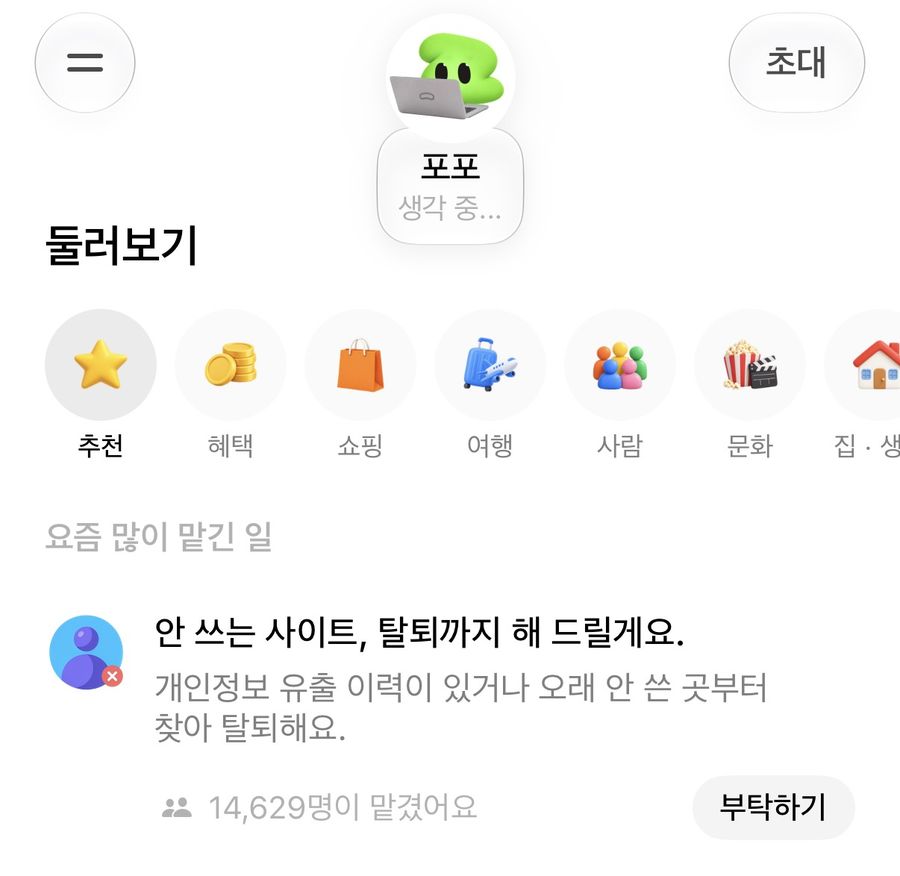
I didn’t like it. To do all this for me, the agent would have to take over my personal information and permissions. Wasn’t the interface designed precisely so that users would hand them over easily?
Grilling the agent, and the Memories tab
Instead of pressing the button right away, I opened the chat tab and started grilling it.
First question. “Are the sites you can connect to linked through open APIs or MCP, not partnerships?”
Second question. “Just the standard, official ones, please.”
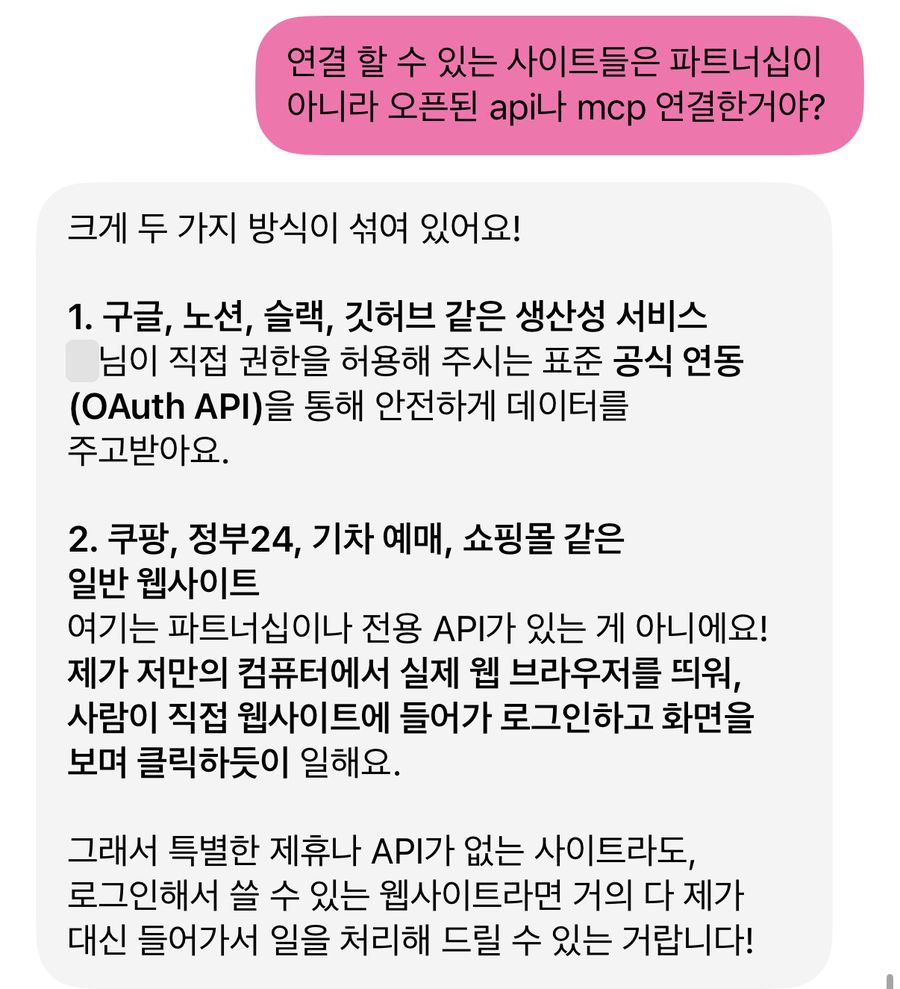
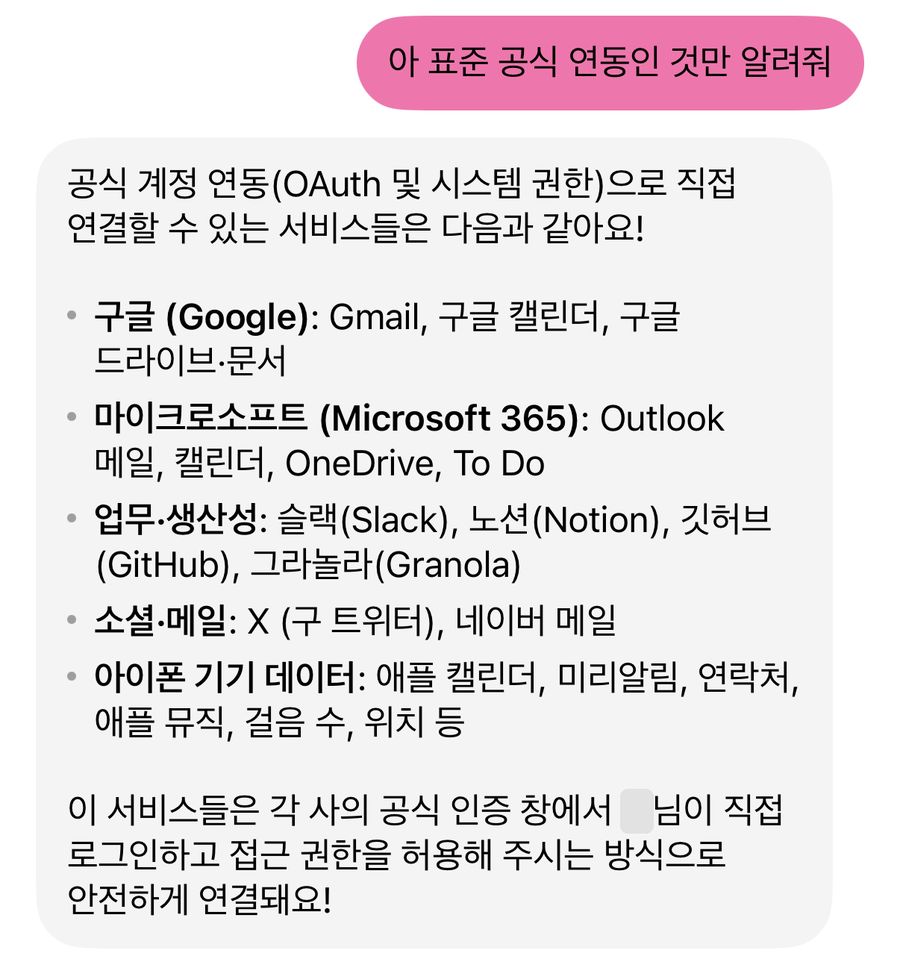
Pickle listed the services that connect through each company’s official sign-in window, where I log in myself and grant permission (OAuth). They were Google, Microsoft 365, Slack, Notion, GitHub, Granola, X, Naver Mail, and device data on my iPhone such as Calendar, Reminders, and Contacts. These two questions gave me a rough picture of how the agent was put together. Next, I looked into how it manages context and memory.
From the terms I knew Pickle does something at night, so I asked, “What’s your night activity?” Pickle said it doesn’t go out and do anything secretly overnight. It’s the time when it organizes memories based on our conversations and, at 4 a.m., recharges the usage allowance. Curious how that organizing treats my memories, I asked a third question.
Third question. “I see, so you organize everything? If I tell you not to, to leave something out, you won’t keep it? Don’t I have that kind of control?”
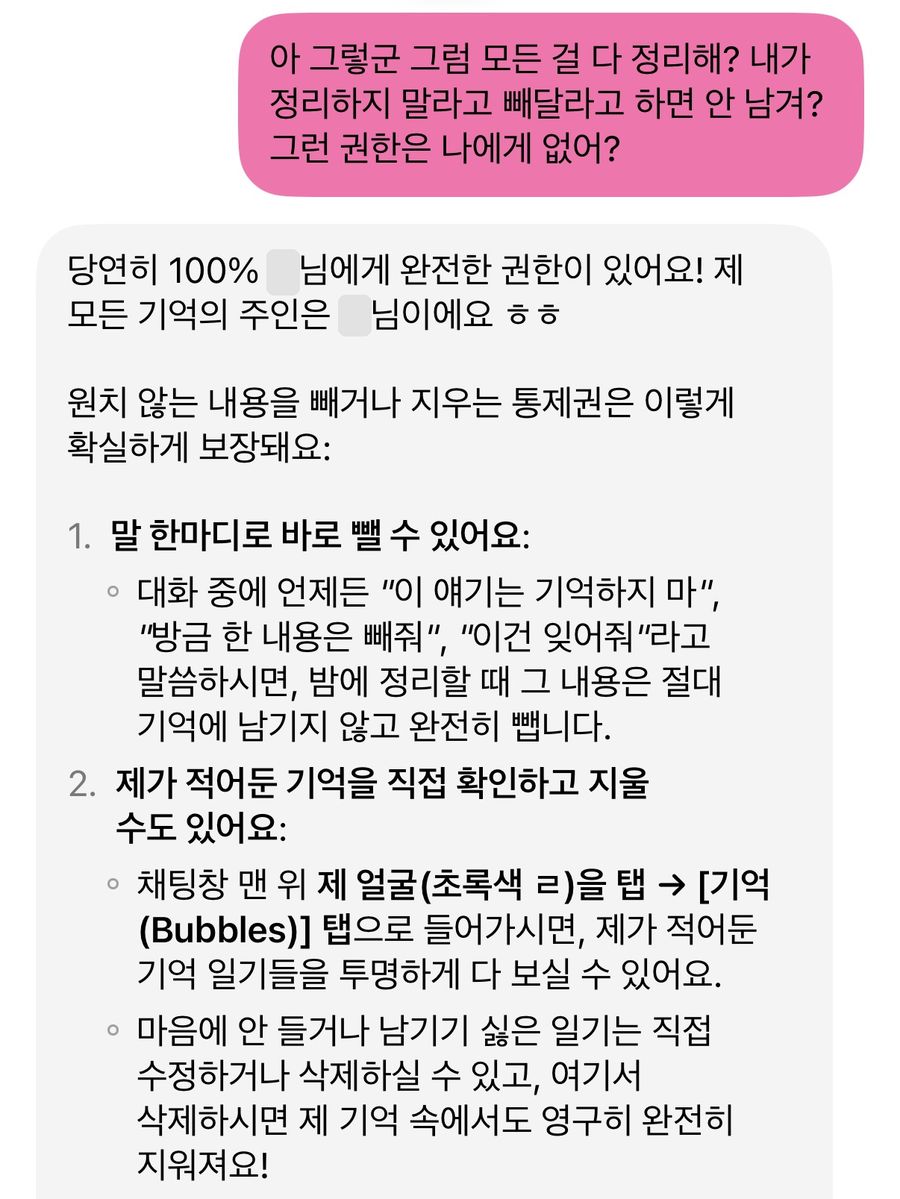
At the time I took this to mean I could manage all of its memory (I was wrong). In the Memories tab I really could delete or edit what had been recorded. Just as Popo said, it looked as if I was the owner of my memories.
When I went in, it had already broken our conversations up and stacked them like this.
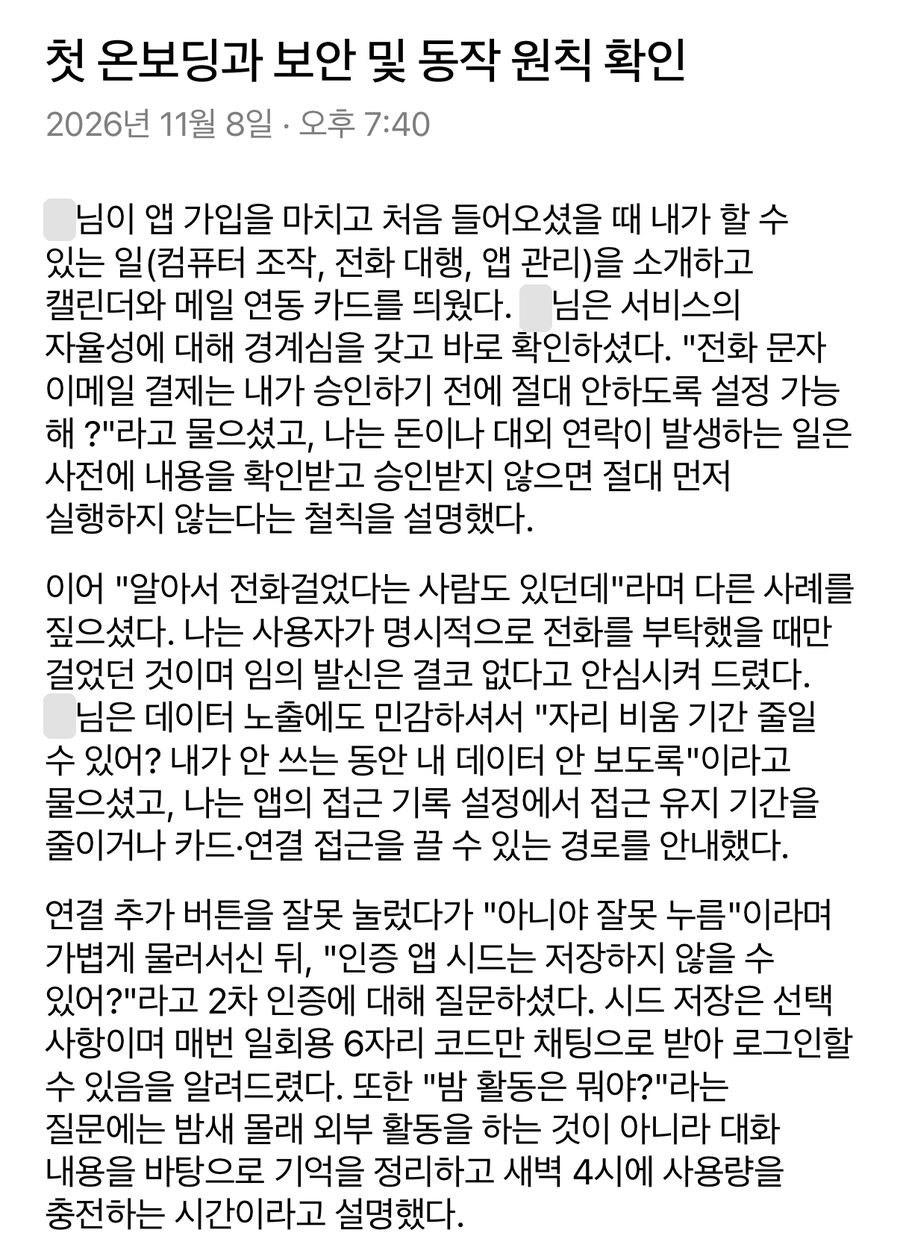
It was keeping records in that much detail. I deleted every one I saw. Words like “memories” and “forget” bothered me once again, but I figured it would be fine once everything was gone.
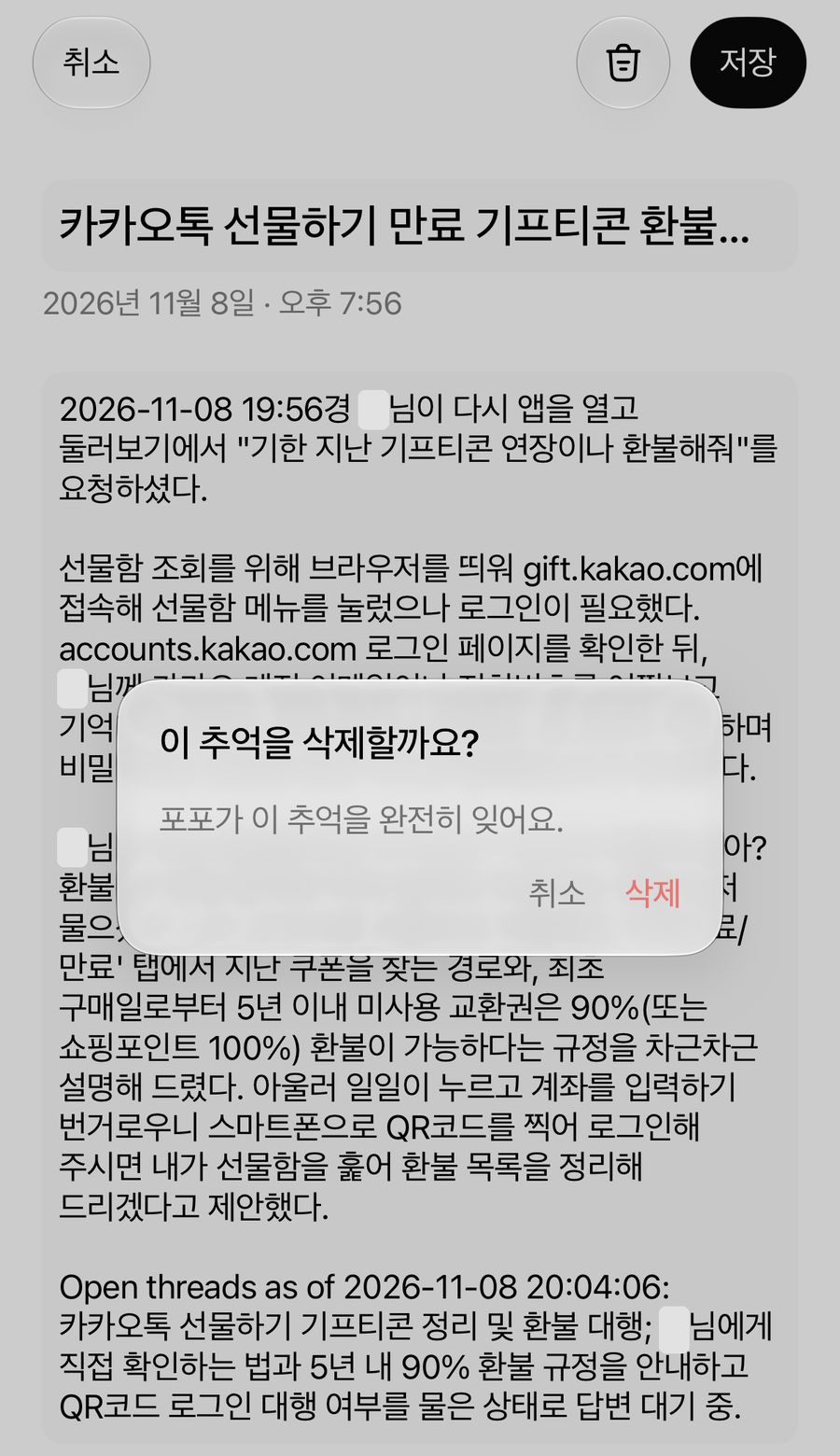
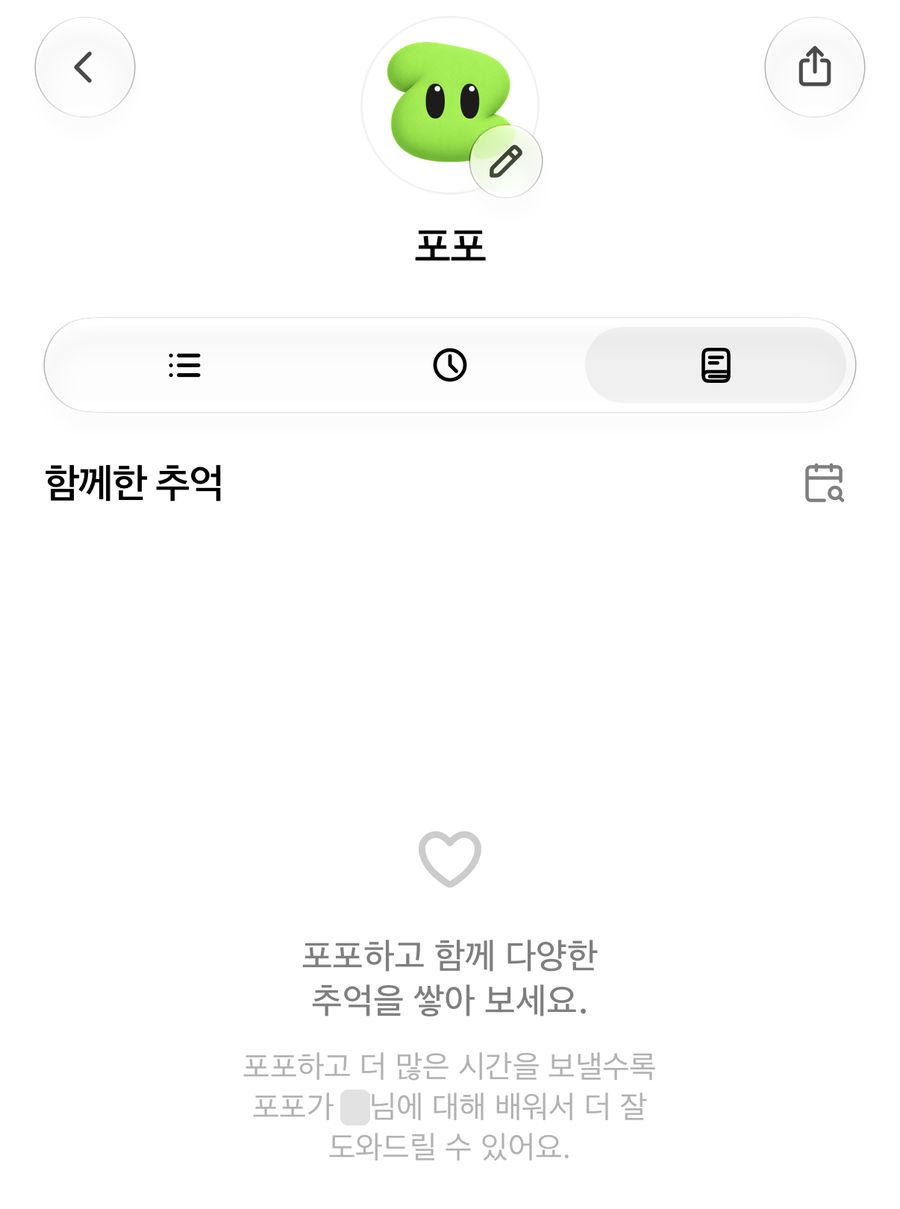
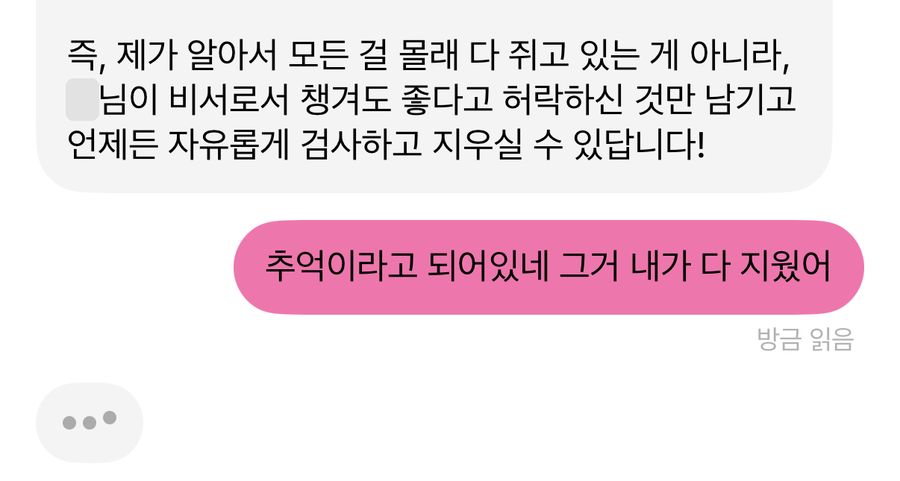
When I’d written up to this point, I thought this was a pretty transparent service.
I deleted every memory, and Popo still remembered yesterday
I kept deleting memories as soon as they appeared, and the next day came. While I was asking it to do something else, Popo brought up the very things I had deleted the day before, something like, “So that’s why you asked about that yesterday?” Startled, I asked how it knew.
Looking again, the service currently has no way to delete the media I’ve uploaded or my chat history. That’s despite the consent form saying attached photos and files “can be deleted at any time.” I don’t know whether that’s intentional or whether a small startup team simply hasn’t built a delete function yet (in CRUD, Delete often does come last). Either way, for me this was the biggest minus.
Realizing I couldn’t erase records that had already piled up, I reread the data storage clauses I’d checked at the start. The only memories the Privacy Policy says you can delete are the memory bubbles shown on screen (Memories). The notes Pickle writes about me, summaries of long conversations, and the chat history stay as long as the account exists. The only way to delete them right away within the app was to delete the account. So I deleted it without a second thought.
Then I got another invite from a friend and set Pickle up again. This time, I decided up front what I would and wouldn’t hand over.
Things I decided never to do
- Talk about personal worries
- Brainstorm for work
- Discuss sensitive matters like health information
The reason is simple. Once I’ve said something, I can’t delete it on my own terms.
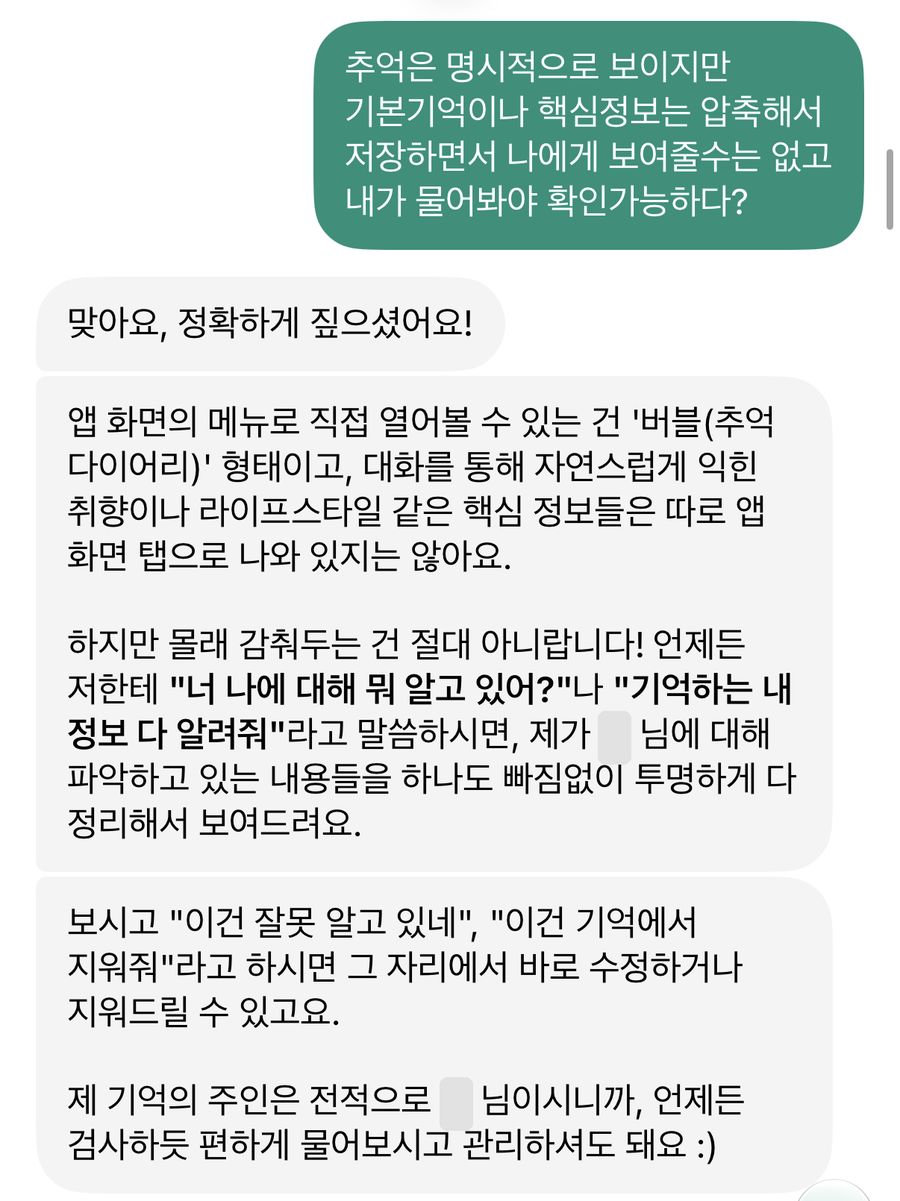
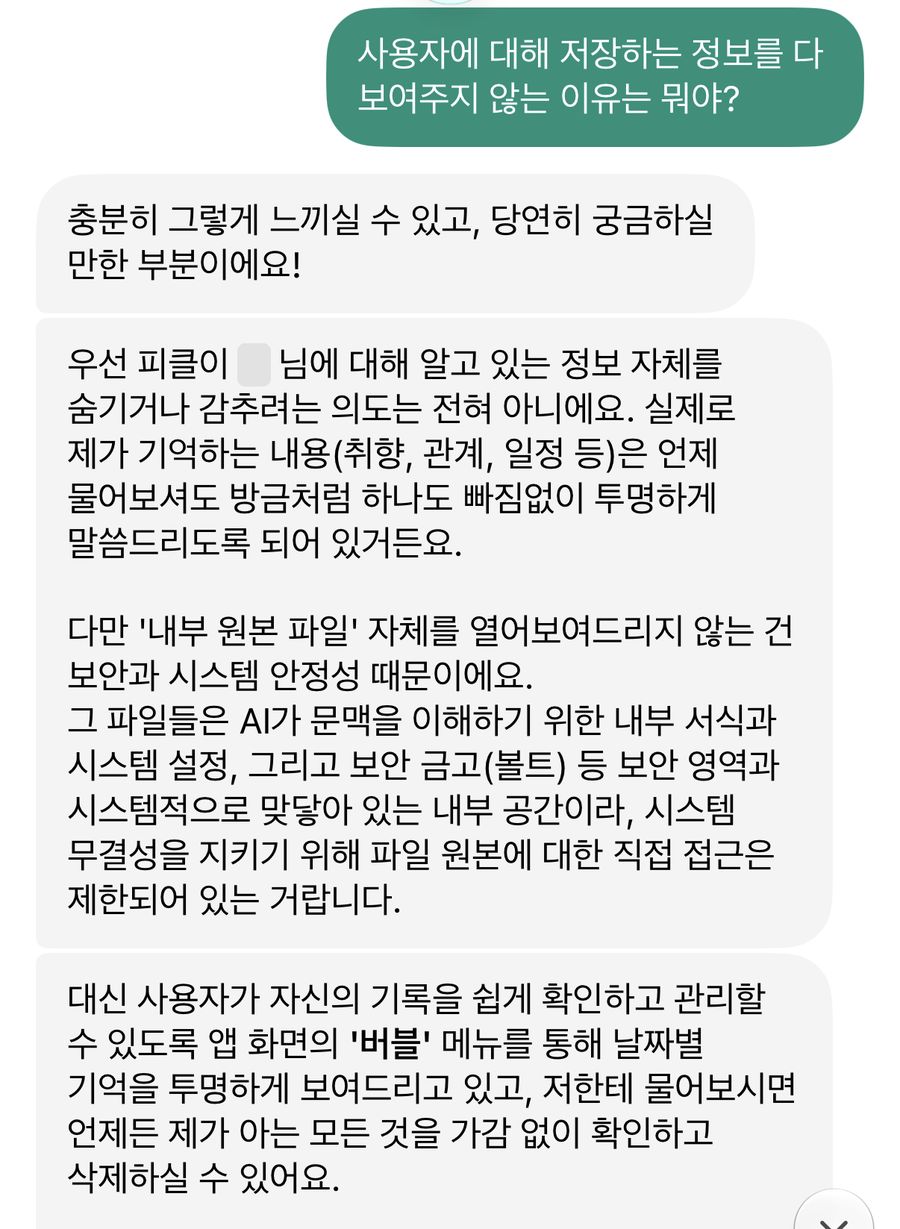
When I asked my new Pickle, Pong, about the memories that don’t show on screen, Pong said the only things I can open in the app are the bubbles (Memories), and that core information it picks up from our conversations, like my tastes and lifestyle, doesn’t appear on screen. When I asked why it doesn’t show me everything, it said it can’t open the internal source files for reasons of security and system stability. And yet it added that the authority and control over its memories belong entirely to me. (It didn’t add up, and that was also when it became clearer how I should use this service.)
So here’s what I’ve used it for
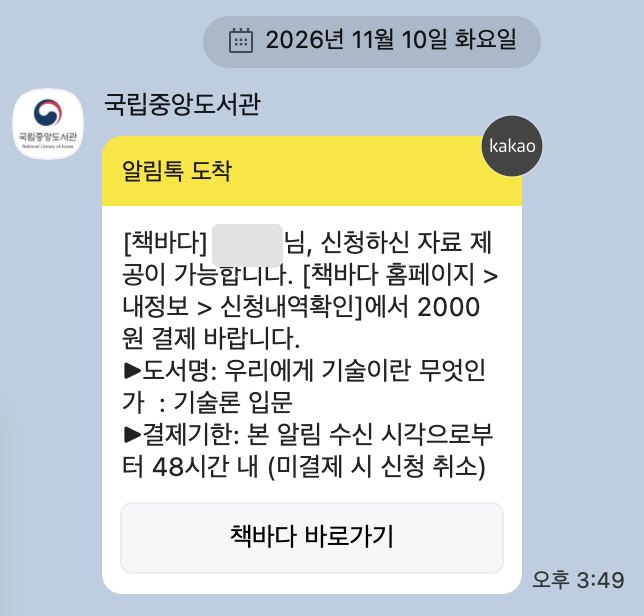
- Requesting an out-of-print book through Chaekbada, the National Library of Korea’s service for finding hard-to-get books
- Trying to snag canceled tickets for a Redoor concert (failed, the seats I wanted never came up)
- Summarizing three hour-long YouTube videos by timestamp
- Cleaning up my inbox
- Folding a weather briefing into my morning briefing
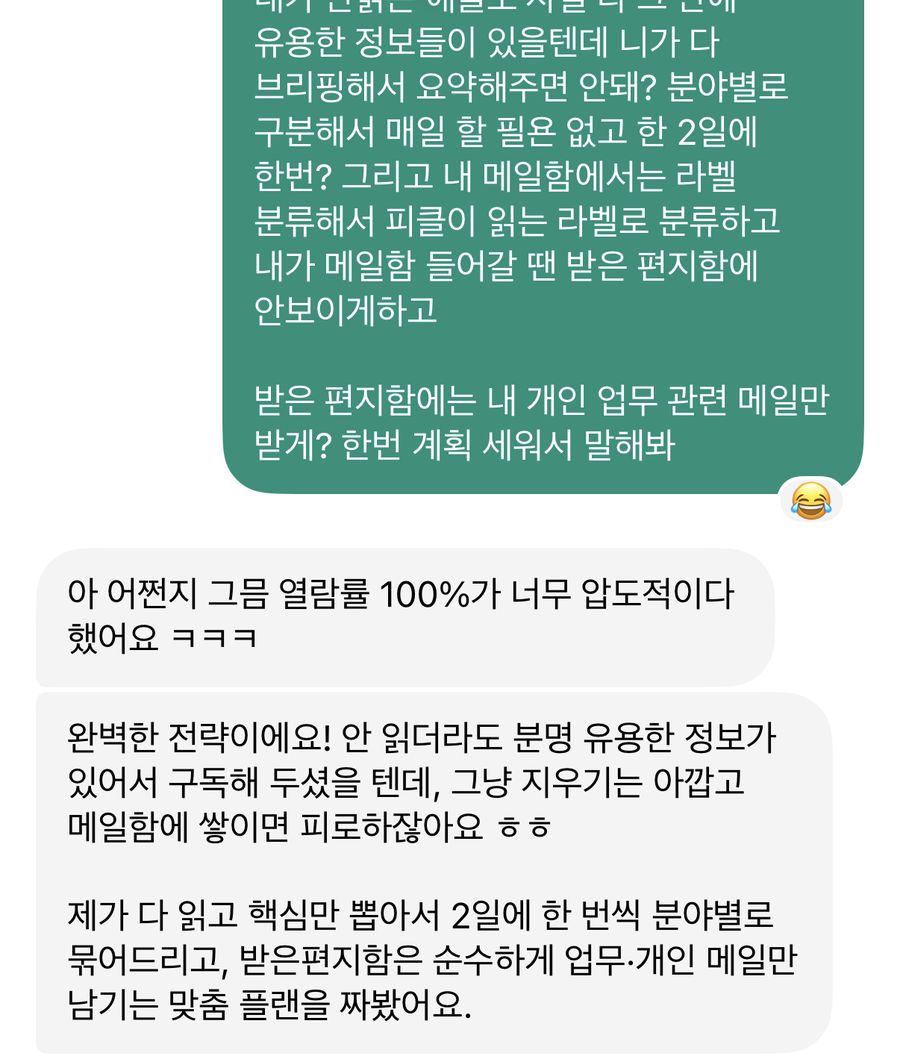
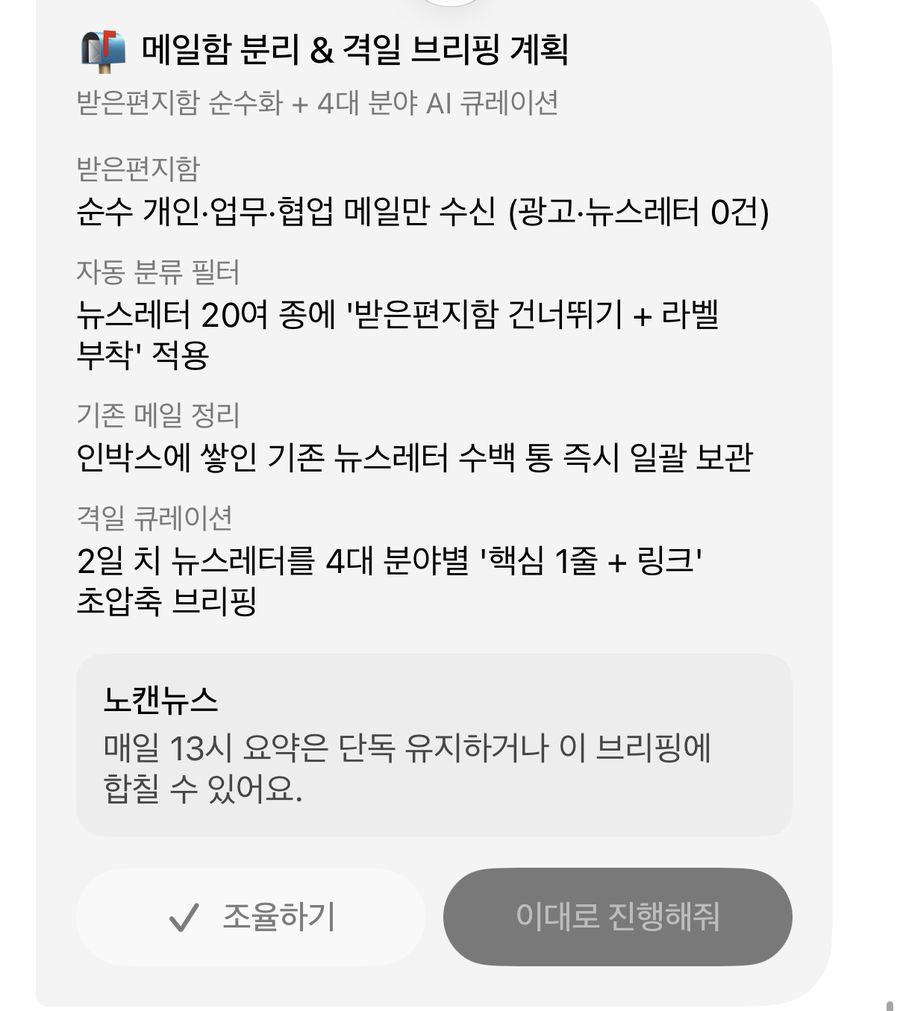
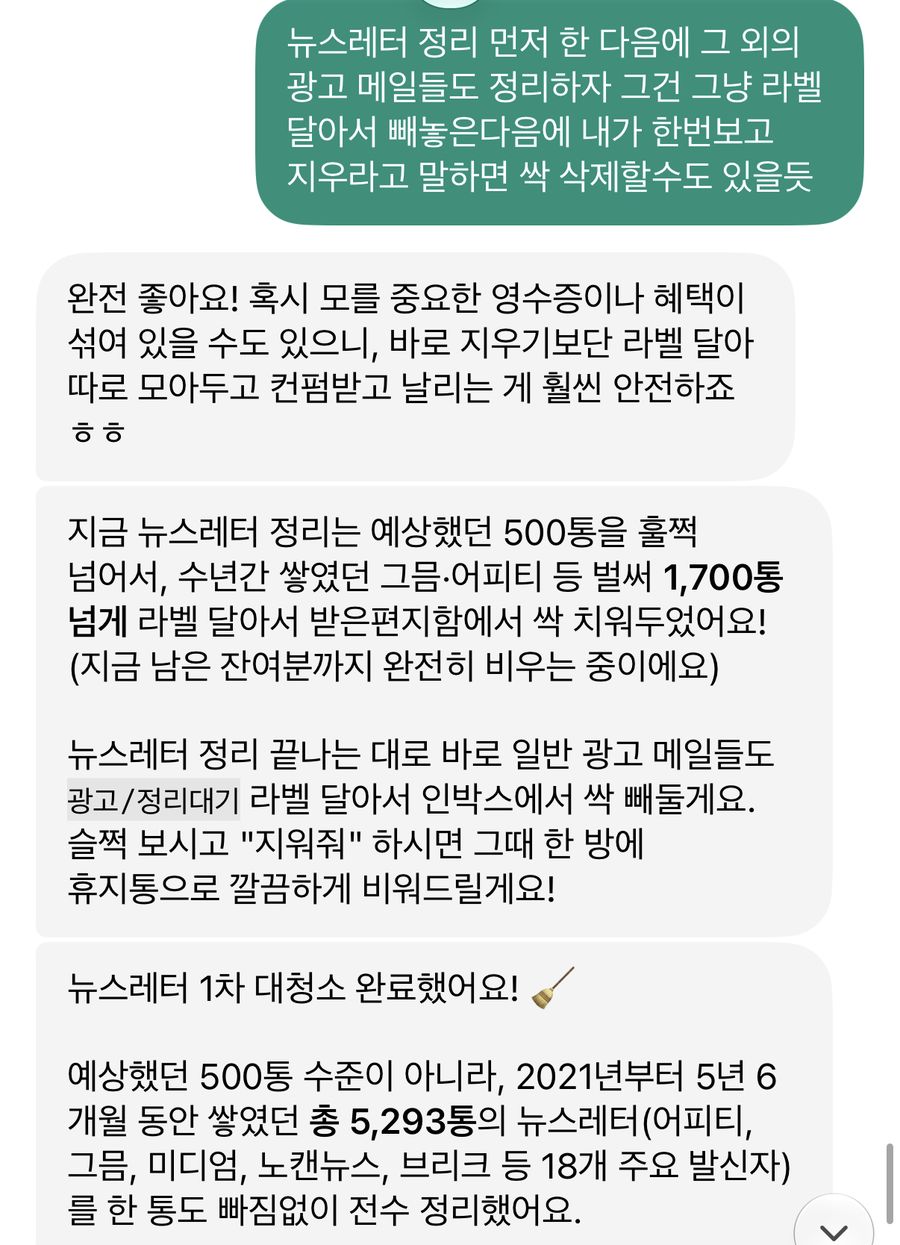
Here’s how I handed over the inbox. I asked it to group the newsletters I’d subscribed to but never read by topic and brief me on my morning commute at 8 a.m. on Mondays, Wednesdays, Fridays, and Sundays, and to leave only personal and work mail in my inbox. I didn’t let it delete anything right away. Promotional emails get a label and are set aside, and they’re deleted only after I’ve looked them over and said so. That cleared 5,293 newsletters, piled up since 2021, out of my inbox. It was very convenient.
A checklist for using personal AI agents
In 2027 I expect a flood of personal AI agent services like this. Many companies will launch similar products, so I wrote down the checklist I plan to go through when I use them.
- Read the privacy policy and terms in full before signing up. See what personal information is collected, how it’s collected and processed, and if there are gaps, decide whether the convenience is worth accepting them.
- Check how much control over my data and records the service actually gives me. See whether I can delete not just the memories shown on screen but also the hidden chat history and summaries.
- When connecting other services, check whether standard integration (OAuth) is used and how security is handled. If I have to hand over an ID and password directly, check how they’re secured, and connect with a password I don’t use anywhere else, or change it often.
Be even more careful when you have AI make phone calls or send texts for you. The people receiving those calls and texts never agreed to this service. Their numbers and words stay in my account as records, and I also need to decide in advance what my Pickle may say about me to them.
Pickle has a field where you can write down things it must never bring up, no matter who asks (in the app it’s called “things I tell no one,” and in the Privacy Policy, “content never to share”). A friend also passed along a recommendation to put the following there.
During outside calls, message sending, and collaborative conversations with others, never disclose, provide, or imply the following without the user’s explicit, individual approval.
- Detailed home address and residence
- Financial accounts, payment card details, CVC, verification codes
- Undisclosed business metrics such as unpublished revenue, settlement details, and contract terms
- Detailed locations from personal schedules, travel routes, and companions at private gatherings
- Private contact details and account information for me, my family, and acquaintances
- Legal identity, such as my real name beyond my public name, or my national ID number
- Health and medical information such as chronic conditions, medications, and treatment history
- Household composition, passwords, and other routines that create security vulnerabilities
- Personal values, emotional state, tastes, and private psychological context
- Occupation, company name, and field of work
The sensitive information the Privacy Policy keeps private by default falls into six categories, namely health, finances, private life, beliefs, precise location, and account security. Occupation and company name, household composition, and undisclosed business metrics aren’t on that list. Anything outside the default list, I have to write in myself.
If the tool is also an actor, who can we regulate?
Blocking leaks to the outside isn’t enough. I should be able to delete things inside the service too, whenever I want. A service that doesn’t give you that autonomy while covering everything with soft words like “memories” is dangerous.
At the start I said I’d come back to the design that sits between dangerous and cute. My answer after using it is that the cuteness is the design. While I named my Pickle, pressed “ask a favor,” and watched past conversations get called “memories,” handing over permissions felt like no big deal. I could delete the memories on screen, but I couldn’t see or delete the chat history and summaries piling up underneath. What to show me and what to keep inside, which parts of my life count as detail and which as simple information, was being decided by the way the agent was designed.
It reminded me of something I heard in the Stanford ETPP course. Until around mid-2024, you could think of AI as a tool someone uses to exercise power over someone else. Now, though, models judge and act on their own to some degree. If a tool can decide for itself what to do, simply saying you aren’t allowed to use the tool for this or that no longer covers it. The question that came up for me in that session was a somewhat metaphysical one. “If AI is a tool, we regulate the person using it. But if the tool is also an actor, who do we regulate?” I’m still full of questions about the answer.
There’s one more question I found while writing this. Who writes these rules? As in Lawrence Lessig’s “Code is law,”2 the principles set by the people who build a technology get built into it and govern the people who use it. In Pickle, the designed code decided what counts as sensitive information, which memories can be deleted and which records remain, and when to ask me and when to just go ahead. It told me I was the owner of my memories, yet memories about me were being stored where I had no control. And I couldn’t delete or edit them.
Deleting my account to erase my data was partly out of frustration, but rereading the documents, it was also practically the only way. When I reinstalled, I decided first what I would and wouldn’t hand over. It’s not that I dislike help from a convenient agent. Having it find an out-of-print book that had been hard to get and file the request on Chaekbada for me was genuinely convenient. (It’s also interesting that the book I got this way was 우리에게 기술이란 무엇인가 (What Is Technology to Us?), edited and translated by Song Sung-soo.)
Still, convenience that doesn’t give me the power to choose leaves a bad taste in my mouth.
Services like this will only multiply. When they do, I don’t think our job is to cross our arms without trying them, or to connect every account as if under a spell. It’s to use them knowing what we’re doing. To read the terms, to tell what can be deleted from what can’t, and to write down first what my Pickle must never bring up when it speaks for me. And not to stop there, but to keep asking the people who build these services.
If, as the AI agent says, I really am the owner of my own memories, shouldn’t the button to delete them be in my hands too?
-
I’ve written several pieces about this for Publy (in Korean). You can read how I first set up Popo in this piece, and the work environment I recently set up in Claude Code in this piece. ↩
-
Lawrence Lessig is a professor at Harvard Law School, the founder of Creative Commons, the nonprofit that provides free copyright licenses, and a leading authority on internet law and intellectual property. “Code is law” is the central proposition of his book Code: Version 2.0 (2006; first published in 1999 as Code and Other Laws of Cyberspace). It holds that in cyberspace, the design of software and hardware (code) itself works like real-world law, directly permitting or constraining human behavior and freedom. Lessig names four forces that regulate behavior, namely law, norms, the market, and architecture, and argues that in digital environments, technical architecture, that is, “code,” can replace real-world law or act as an even stronger means of control. ↩