Building an AI Interviewer That Measures AI Adoption
How an interviewer that asked through conversation instead of a survey became a measurement tool for many organizations
When we started AX (AI transformation) at the foundation early this year, I had a few chances to talk about how we were doing it, in a press interview and a talk at COEX. Looking back, what started that whole process and played the most important role in it was probably the AI interviewer.
It began as a tool for comfortably interviewing each team at the foundation about how they work. But the more we used it, the more uses it found. Inside the foundation, we used it to keep measuring how colleagues use AI and to collect examples. Outside the foundation, we used it to assess the AX of organizations in our programs and of other nonprofits.
I can’t open this service to the public right now, but I thought writing down its structure would be good study for me too, so here it is. Think of it as one technical planner’s solo build log. If you need a similar kind of measurement or interview inside your own organization, the structure might be worth borrowing.
Planning Why I chose a conversation with AI over a survey
In March this year, I took on the job of redesigning how the whole foundation works for the AI era. The AX most people picture goes in a set order. Bring in AI tools, run workshops, find use cases. I wanted to reverse that order. Before teaching tools, an environment where AI can do good work has to come first, and for that, we first needed a real grasp of how people actually work today. The first step was interviewing everyone.
At first I thought of a survey. But a survey only moves through its questions in order, so it can’t carry earlier context, and most answers end at “yes” or “no.” Above all, it can’t ask follow-up questions like “Why?” or “What was the situation then?” Meeting everyone in person, on the other hand, would take weeks just to schedule, plus an hour or two per interview. So I built a website where AI plays the interviewer and holds a conversation. Respondents came in through a link and chatted with the AI for about 15 minutes, and the interview records piled up.
The idea started in December 2025, when I talked with Anthropic’s AI interviewer myself. Throughout the interview I kept wondering why it felt so natural, so from the questions and reactions on screen alone, I worked backward to the principles its instructions must have had. Asking questions in reverse, empathizing and then going one step deeper, echoing back the exact numbers and tool names the respondent mentioned, digging into contradictions without criticizing them, and a curve that drifts from light questions toward fundamental concerns. I pulled out these five and used them as material to rebuild for our organization.
The first attempt gave the AI 14 questions as a checklist and told it to talk freely, following the flow. When I took the interview myself, four things broke at once. There was no end in sight, the AI kept repeating the same pattern of “So you do X” followed by a question, its tracking of which questions it had covered was inaccurate, and input tokens shot up to 95K in just 16 turns. So I dropped free conversation and split it into sections.
Part 1/4 · Daily workflow             (2-4 turns)
Part 2/4 · Finding and sharing files  (2-3 turns)
Part 3/4 · Pain points                (2-3 turns)
Part 4/4 · Using AI                   (2-3 turns)
Each part had a cap on turns, and if someone answered briefly with something like “Nothing, really,” the AI was told to move on instead of asking the same thing again. The greeting was placed on the screen in advance without calling the API, so people could join the moment the interview page opened, with no loading. The answer to the first question was picked with a click from the list of tools our organization actually uses. At the top of the screen, one circle per part showed which part you were in. When the AI attached a comment like <!-- PROGRESS: {"part": 3} --> to the end of its response, the screen read it, updated the circles, and removed the comment before showing the message.
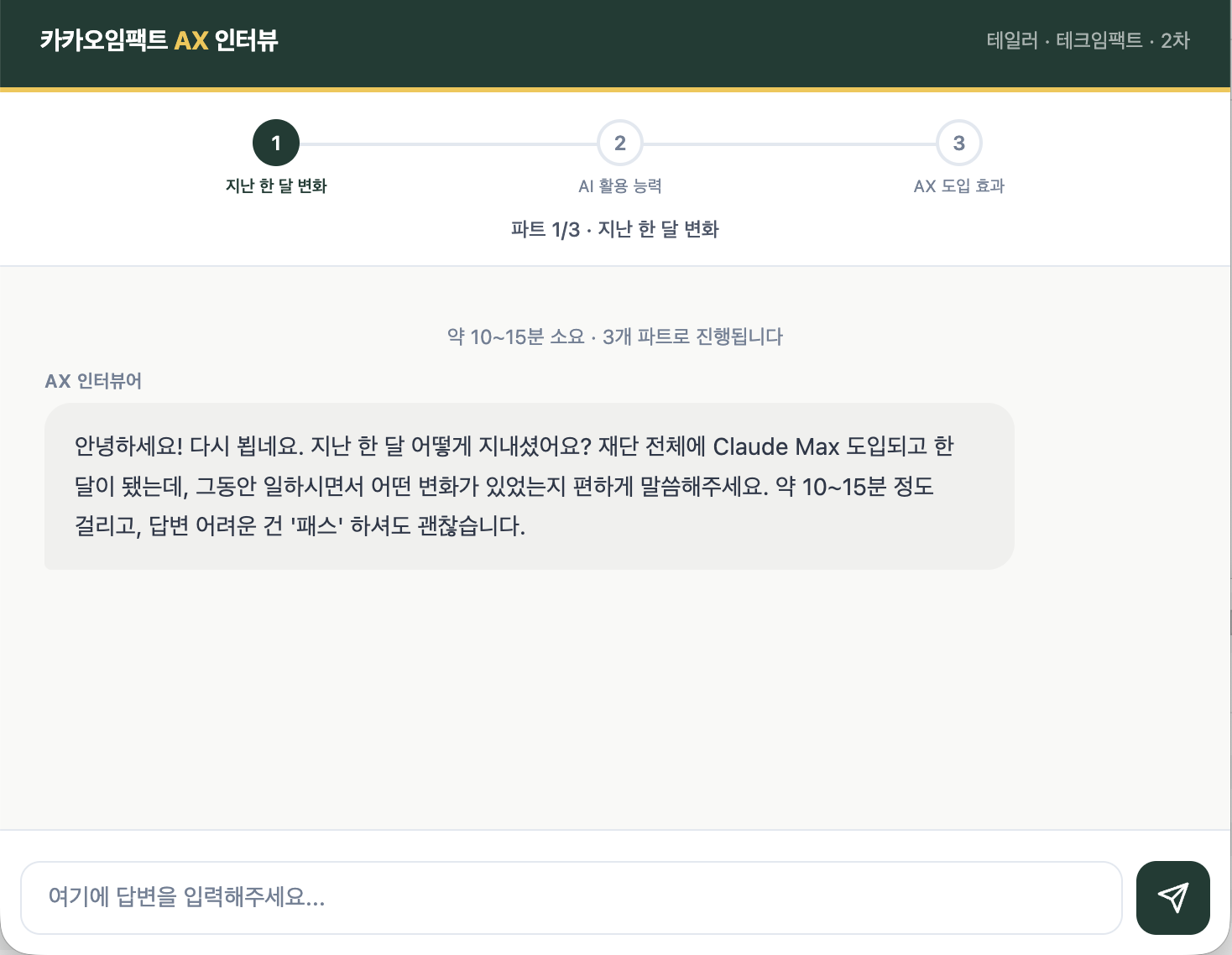
I kept the first setup as simple as possible. Static HTML with Vercel serverless functions, and conversations saved in the free tier of Upstash Redis. For the model, I chose Claude Sonnet. Natural conversation mattered more than deep reasoning in an interview, and in my experience, conversations with Sonnet felt the smoothest.
Once it was built, it felt like a waste to use it once and throw it away, so a month later I ran another round of interviews with new questions. It was exactly one month after Claude Max seats had been provided to the whole foundation, so this time I asked what had changed over that month. Looking back later, simply repeating the same questions could itself become a curve of how the organization changes.
Meanwhile, I had built another interviewer in a similar format for the organizations in the Tech for Impact program. Around July, I merged the two separately run interviewers into a single engine plus question-set data, and that became the finished model. Since then, more than 100 interviews have been run through this service. From here on, I’ll walk through how I built the unified AI interviewer service.
Design The big picture
Here is the current structure on a single page. The screens and the server functions live in one Vercel deployment, and since there is no build step, the HTML files and function files are deployed as they are. State is kept in two places. While a conversation is in progress it lives in Redis, and once it ends it lives in Postgres. The features are easiest to understand in four chunks. The interview engine, measurement and scoring, outputs, and operations.
Design Key features
The four chunks in the figure above are the feature groups. For each group I first describe what it does. The detailed features are defined one line each, in the feature-spec format I use when planning, and folded into a toggle.
Interview engine
- The part that talks with respondents. Ten kinds of survey UI (5-point scales, multiple choice, card sorting, splitting 100 points across items, and more) slot in between the conversation parts
- Question wording, order, and the interviewer’s instructions live in question-set JSON files, not in code
- What we want to ask shifts a little with every measurement, so I’ve kept making new sets. There are 10 now
- The server reads question sets straight from the deployed files, not from the DB. Fix a set and deploy, and even interviews in progress pick it up from the next turn
- The system prompt is assembled in three layers
- Rules shared by every interview, instructions specific to the question set, and information for this turn only (the respondent’s name, the current part, questions to skip)
- The first two layers are the same every turn, so they go into the prompt cache, and only the last layer is attached fresh each turn
- Whatever the respondent types is read only as an interview answer, with the interviewer’s role fixed. I didn’t block things with a list of forbidden words
6 detailed features · ENG-01~06
| Feature | User | Definition |
|---|---|---|
| ENG-01 Org code entry | Participant | Enter with an org code and pick your name from the roster. Some rounds are anonymous and run without a roster. |
| ENG-02 Consent and one submission per person | Participant | The interview starts only after the server confirms consent, and each person keeps only one completed record per round. |
| ENG-03 Mixed conversation and survey | Participant | Ten kinds of survey UI sit between the conversation parts. |
| ENG-04 Resume | Participant | Even if the window closes or the connection drops, it picks up again from the last turn. |
| ENG-05 Off-topic guard | Participant | If off-topic answers keep coming, it moves on to the next question, and if many questions get skipped, it wraps up briefly. |
| ENG-06 Individual diagnosis | Individual | No code needed. Pick only your organization’s type and size and get diagnosed on your own. Opened and closed for set periods. |
Measurement and scoring
- The unit of measurement is the round, not the organization. Rounds pile up under an organization, and each round sets which question sets it uses
- When an interview ends, survey answers and conversation content are turned into scores together and shown as a radar chart and a type
- The scoring formula also lives in the question-set file, so when the set changes, the formula changes with it
- Finds what the same person answered in the previous round and compares it with this round
4 detailed features · MSR-01~04
| Feature | User | Definition |
|---|---|---|
| MSR-01 Round management | Operator | Create, open, and close rounds under an organization. Each organization has only one open round. |
| MSR-02 Question-set assignment | Operator | Set the combination and order of question sets for each round. Opening a round saves the question definitions as they are at that moment. |
| MSR-03 Comparison with the previous round | Participant | Pulls up answers and examples from the last round and shows them side by side with this round. |
| MSR-04 Time series | Operator | See an organization’s change across rounds on one screen. |
Outputs
- There are two ways to get results out of a round. In actual operation, downloads were used far more
- Operators download round results from the admin page
- Per-person summaries and per-question answers as CSV, raw data as JSON
- The raw data includes the question definitions and formula that round used, so that when recalculating later, that round’s yardstick can be read from the file alone
- The integrated organization report is made by analyzing conversations qualitatively with an LLM, and is published after an operator reviews it
- Anonymization
- Names are replaced with “Respondent N” before anything goes into the LLM
- Organizations with fewer than five people get no quotes in the report
- One more pass right before saving masks any remaining identifiers
- Teams with fewer than three people aren’t shown as teams and are merged into the organization total
4 detailed features · OUT-01~04
| Feature | User | Definition |
|---|---|---|
| OUT-01 Completion screen | Participant, Individual | Shows a radar chart, a type name, things to try next, and a prompt to paste into your own AI. Score numbers are not shown. |
| OUT-02 Round result download | Operator | Download per-person summaries, per-question answers, and raw data as CSV and JSON. Files with real names can be downloaded only by the super admin. |
| OUT-03 Integrated organization report | Org contact | Once an operator reviews and publishes a report built from qualitative analysis of the conversations, it opens with the org code. |
| OUT-04 Anonymization | System | Removes names before analysis, and for small organizations and teams, blocks quotes or merges them into the organization total. |
Operations
- Since I run the service alone, things that are easy to miss run on their own every morning, and things that are hard to undo wait for a person to press the button
- Organizations and rosters are managed in a master sheet. A CLI on the operator’s PC reads the sheet, shows a preview, and then registers them. The server never reads the sheet directly
- Three morning checks. Checking rounds near their deadline, generating reports, and deleting raw conversations of organizations with no plan to measure again
- Slack notifications at each step. The buttons in the notifications are one-time signed links valid for 48 hours, so approval takes one button and no Slack app server
- Deleting an organization’s data takes two steps, through a confirmation token valid for 5 minutes
- Every action that changed state, and the tokens and cost of every Claude call, are logged
5 detailed features · OPS-01~05
| Feature | User | Definition |
|---|---|---|
| OPS-01 Sheet import | Operator | A CLI on the operator’s PC reads organizations and rosters from the master sheet and registers them after a preview. |
| OPS-02 Morning checks | System | Runs deadline checks, report generation, and raw conversation deletion every morning. |
| OPS-03 Slack notifications and approval | Operator | Notifies through Slack at each step, with approval in one button. |
| OPS-04 Deletion and audit log | Operator | Deletes by organization or by raw conversation with a two-step confirmation, and records every action that changed state. |
| OPS-05 Cost log | Operator | Records the tokens and cost of every Claude call, viewable on the admin page. |
Build What happens during one interview
The core of this product is a single turn of conversation between the AI interviewer and the user. I drew a sequence diagram of what happens between a respondent sending an answer and receiving the next question.
There were two things I cared about most while building the interview module.
Not breaking, even if you don’t finish in one sitting
People take the interview in the gaps of their workday. They get pulled into meetings, close their laptops, and open them again the next day. So I treated interruptions as the default, not the exception. The June version did little more than save to the browser and, asynchronously, to Redis. Now, at the end of every turn, the server leaves a checkpoint of the state at that moment in Redis and keeps it for seven days. Whether you refresh, lose your network, or come back the next day, you pick up from that point.
Interruptions don’t only happen on the respondent’s side. When the Claude API is overloaded and returns a 429, the SDK retries up to five times, and concurrent calls are capped at 10 by a distributed semaphore built on Redis. The semaphore records timestamps in a sorted set, so even if a function dies midway, its slot is reclaimed on its own after a while. In October, I fixed a bug where sending an answer while a response was still streaming made the same question repeat.
A guard that moves on when answers keep drifting
In July, while testing the individual diagnosis internally, I saw that if you kept giving answers unrelated to the question, the interviewer would rephrase and ask again for up to seven turns. There was no condition for ending, and the prompt was set up to get an answer out of the respondent no matter what.
I didn’t choose to end the interview. Ending it loses the data and makes for a rough experience. Instead, I had it skip that question. The most important thing here was how to sort what respondents say. Words that answer the question, words unrelated to the question, and questions like “Why are we doing this?” If the third kind counts as off topic, you get an accident where someone who asked because they were curious about the purpose ends up being skipped. So when someone asks about the purpose, the interviewer briefly explains it and returns to the original question, and this doesn’t count toward the skip tally.
The model records its judgment every turn in the progress tag at the end of its response, and the server does the counting. By default the model moves on by itself, following the prompt rules. If it still doesn’t, the server adds a sentence telling it to skip in the next turn’s instructions, so it is a double safeguard. When many questions have been skipped, the rest of the conversation is shortened to wrap up, but the survey parts are still collected as usual.
I verified it twice. First I ran the actual server code turn by turn with a turn simulator that replaced the model’s output with a script. Then I ran the real model on a mix of off-topic answers, purpose questions, and normal answers (it cost about 10 cents). With the real model, I found cases where an answer that went on after something like “Ah, I see” was misread as a purpose question, so I changed the rule to treat it as an answer whenever an answer is included.
Build Rounds, for measuring one organization many times
When I first built it, this feature didn’t exist. A single row in the organizations table was both “an organization” and “one measurement,” because I was thinking of a one-off diagnosis. But the foundation measured four times starting in April, and the organizations we work with also measured four times, from M1 to M4. To measure the same organization again, I had to create another organization, and then the rounds of the same organization couldn’t be followed as one line.
On August 24, I split measurement rounds off from organizations. I created a rounds table to hold rounds separately and let rounds pile up under an organization.
An org code never changes once it is attached to an organization. Participants come in with the same code every time and are connected to the round currently open in that organization. So each organization must have only one open round, and this rule is enforced not by app code but by a partial unique index in the DB. Opening another round closes the existing one automatically. When a round opens, the question definitions and formula at that moment are saved with the round, and the question sets of an open round are locked. Even if the set files change later, what that round asked has to remain.
Once rounds piled up, reading previous rounds followed. A new round can start by copying the previous round’s roster. Whether it is the same person is decided by email, or by name within the same organization if there is no email. From the foundation’s fourth round, the interviewer pulls up the examples a person wrote in the previous round and asks whether they are still keeping them up, shows answers from the first round in April above some questions, and overlays the previous round as a dotted line on the completion screen’s radar chart. The first live round on this structure was the partner organizations’ M3 at the end of September.
Structure Data model
I drew how the data is divided and connected as an ERD (entity relationship diagram). There are 13 tables, and the central axis is the single line from organizations to interview_sessions.
I kept a few principles. The rules that each person keeps only one completed record per round and that each organization has only one open round are enforced by DB constraints, not by app code. Even if the same person submits from two tabs at once, the DB accepts only one. The fun part is that the one-submission-per-person index was originally per participant. When rounds were split off and participants came to belong to rounds, the rule of one submission per round held on its own, without touching the index.
Status values are CHECK constraints instead of PostgreSQL ENUMs, which makes adding a value a much lighter migration. Question sets are also stored in the question_sets table, but rounds refer to them only by a list of set names, and actual interviews read the deployed JSON files. Individual diagnosis records (individual_submissions) are deliberately not linked by key to any table on the organization side. The point is to keep records left without names from mixing with organization data.
Principles I plan and decide, Claude Code builds and tests
It is hard to say whether I built this service alone or with someone. I did the planning and the deciding, and Claude Code took on the building and testing. So from the start, I kept the build log split in two, what I told it to do and what Claude decided on its own.
For example, removing the overall score from the report was my instruction (“Just drop the score, keep the radar chart”). On the other hand, Claude decided how to store anonymous respondents who join without a roster. Allowing the participant field to be empty would have meant changing org codes, sessions, reports, and aggregation everywhere, so it chose to create a single participant row named “(Anonymous)” and keep the existing logic as it was. Writing things down this way means that later, when I wonder why something looks the way it does, I can start by finding whose judgment it was.
For big structural changes, I didn’t build right away. I wrote a plan document first, reviewed it, and only after the review was completely done did I build, keeping an execution log as I went. I followed this order every time I added something new, like the individual-axis refactor, the report consolidation, and the round split. There are 331 vitest tests that run in just over a second with no network. A fake DB interprets SQL by pattern and fails immediately when it meets a query it doesn’t know, so whenever I change a query, the tests tell me first.
Is the system prompt still the most important part?
When I first built this service, what I agonized over the longest was the system prompt. Personality, tone, taboos, announcing part transitions, reporting progress. The prompt handled almost everything. As I kept running it, merging the services and fixing features, a large share of that work came to be decided by code outside the prompt. In the way it works now, the circles on screen, not the prompt, show which part of the interview you are in, Redis checkpoints stitch interrupted conversations back together, and the server counts the off-topic answers.
In November I went the other way and changed the instructions to stop announcing part transitions, one of the prompts I had once put the most care into. In a resumed interview, the interviewer had mistakenly said “Let’s move on to Part 3.” The screen already shows progress, so there was no need to say it out loud. And as models kept getting better, tone instructions like “Don’t keep repeating ‘So you do X’” weren’t needed as much as before. So these days, rather than which system prompt to use, I spend more time thinking about what to leave to the model and what to build as features in code.
Finally, here are three things I held onto while running many cycles alone, from planning through design, building, improvement, and operation.
First, I did the planning and deciding, and left building and testing to Claude Code. And I logged that process in detail. I decided to the end what to build and what to cut, and in the build log I separated what I told it to do from what Claude decided on its own. Thanks to that, even months later when I changed the structure, I could improve things while checking why something was shaped the way it was and whose judgment it had been.
Second, I wrote a design document before building anything new. For work that changed the structure, like the individual-axis refactor, the report consolidation, and the round split, I wrote a plan document first and built only after the review was done, keeping an execution log. It is the same way I used to work when planning services and building products. Even though the hands doing the building became Claude Code, settling first in a document what to build and why still worked.
Third, I kept adding test code, but what experience an interview produces could only be learned by trying it myself. Today 331 tests run in just over a second and tell me right away when logic or a query breaks. But the frustration of not seeing the end of the survey in the first version, or the interviewer rephrasing and asking again for up to seven turns after off-topic answers, were not the kind of problems tests could catch. Since the conversation itself is the product, the final check was always to sit in the respondent’s seat and take the interview myself.
Over about a year, the foundation, our partner organizations, and other nonprofits have run rounds with this interviewer, and the completed responses across those rounds now number more than 100. It started as a one-off survey substitute for seeing how my colleagues at the foundation work, and it has become an observation tool that follows how organizations change alongside AI. Planning a product, building it, and putting it to use in many ways for the first time in a while gave me a lot of new experience. Even as the logic behind the scenes grew larger and more complex, I tried to keep things stable so that users wouldn’t feel much of a change. I don’t know yet how this tool will be used next year, but I suspect the experience of building not a one-off product but a service that can be reused again and again will help a great deal in other work too.